Showing posts with label quora marketing. Show all posts

Thursday, May 30, 2024

How to Rank LinkedIn Profile in Search Engines?


LinkedIn is a fantastic social media site for professionals to connect and network. It's also an important

platform for companies to use to raise brand awareness and engage with their customers. Many people

are unaware that LinkedIn is a dynamic site that gets indexed and scanned by Google on a regular basis.

As a result, it's critical that you improve both your personal LinkedIn profile and your company's LinkedIn

page.

Why Does Your LinkedIn Profile Need SEO?

Optimizing your LinkedIn profile and pages can help you enhance your search visibility, just like

optimising your website. Optimized profiles and sites will show up in search results, generating leads and


converting them. LinkedIn optimization allows you to engage with like-minded professionals in your field

while also attracting clients.

7 Ways to Make LinkedIn SEO Work for You

Follow these seven steps to enhance your LinkedIn profile and company page in order to rank higher and

make contacts.

1. Make use of keywords.

Your LinkedIn profile and page, like your website's SEO, should include keywords that your target

audience searches for. You should use these terms throughout the copy of your LinkedIn page once

you've completed your keyword research. The following sections should have keywords:


● Tagline

● About

● Experience

● Skills

LinkedIn also suggests that you include more parts in your profile. You can add more keywords and

keyword phrases that your target customers use while searching for your products and services by adding

more sections. If you haven't already, take advantage of the Accomplishments or Featured areas.

2. Make your LinkedIn profile URL unique.

LinkedIn gives you the option of creating a unique URL for your profile. When consumers search for your

name or organisation, a LinkedIn profile or business page with a customised URL will appear higher in

organic search results. LinkedIn explains how to personalise the URL for your personal profile or

company page.


3. Give your profile photo and banner image a name.

Are you considering updating your LinkedIn profile with a new headshot or background photo? Rename

the image to add your name or relevant keywords before uploading. These photographs will be indexed

by Google, allowing your face or company logo to appear in image search results.

4. Establish backlinks

Backlinks are at the heart of SEO and Google's page rank algorithm. By connecting to your LinkedIn

profile in your blog entries or on your website, you can build backlinks. In the author area of your blog, link

to your profile, or in the content of your website, link to your company page.

5. Publish content that has been optimised.

LinkedIn's algorithm pushes LinkedIn articles and native videos to more users' eyes. This information is

likely to be seen by three to four times as many people as a shared article or blog post, according to

Search Engine Land. As a result, this text should incorporate keywords and be SEO-friendly. To attract


visitors to your website, incorporate a call-to-action within the LinkedIn article or in the video post.

6. Make frequent updates

Consistency in publishing updates is one of the most critical aspects of LinkedIn SEO. You must

frequently add fresh content in order for Google to have new information to crawl. LinkedIn is an excellent

place to promote your content marketing products, such as blogs, case studies, manuals, and ebooks.

You can use LinkedIn articles to repurpose blog content, but be careful not to submit duplicate

information.

7. Analytical data

Check the data to make sure your optimization efforts are functioning. Both personal profiles and

company sites on LinkedIn have analytic reports. Your LinkedIn profile's stats reveal the amount of profile

views, search appearances, and post views it has got. The amount of new followers, post impressions,

and unique visitors are all tracked by LinkedIn. Remember to keep note of conversions as well. Determine

how many leads are arriving to your website from your LinkedIn profile or page using Google Analytics.

When you follow these seven steps to optimise your LinkedIn pages, Google will index your page in ways

that will benefit you and your company. Use appropriate keywords and phrases, create creative material,

and analyse the data. Download our free SEO checklist for further help with SEO on your social network,

website, or blog.

Adding more connections in Linkedin

 Add More LinkedIn Connections


Make your LinkedIn connection requests more personal.

Rather, go to the person's profile page and click the "connect" button there. That will open the box below,

where you can add a personal comment to your connection request, such as "It was great to meet you

last week in Chicago." Let's stay in contact."

If you're texting someone you don't know, such as someone who works in a comparable capacity at

another organisation, make it more relevant by explaining why you're message them.

"I've read your posts and seen some of your work," you might say. I value your viewpoints and would

welcome the opportunity to speak with you."

2. Follow up on networking chances that you have in person.

Building your network may (and does) still happen the old-fashioned way when you meet and interact with

people face to face, believe it or not. In fact, as we return to a world where we transact at least some

business in person, opportunities to engage with people are resurfacing. Make the most of your

opportunities.

3. Break down your growth goals into manageable bits.

It may appear impossible to go from 100 to 500+ relationships. When you divide that number by a number

of weeks or months, it doesn't seem so daunting. Instead of establishing a goal of moving from 100 to

500+ connections in two weeks, try setting a goal of 175 connections in two weeks and repeating the

process.

Remember that the most important aspect of goal-setting is to make them realistic and time-bound.

Also, keep in mind that how to develop LinkedIn relationships should be approached with caution.

Whatever your objectives, it's critical to follow good etiquette and avoid spamming people you don't know.

Quality trumps quantity, and spamming relationships isn't going to help you either.

Expect only a small percentage of your connection requests to accept your invitations. They might have

their own LinkedIn philosophy for evaluating the quality of possible connections and selecting whether or

not to accept requests. When I receive a request, I ask myself the following questions:

Do I or someone I know know who knows who knows who knows who knows who knows who knows who

knows who knows who knows who knows

Is your firm one I'm familiar with?

Do you share industry insights that I'm interested in?

Do you live in a market where I do business?

If I can't respond "yes" to at least one of these questions — preferably more — I'm not likely to accept


your invitation to connect.

4. Look into LinkedIn Groups

LinkedIn Groups are topic-specific forums where you can interact with others in your business or

specialisation to establish relationships, share knowledge, and seek assistance. You can create groups

that represent communities within your target consumers to display your expertise while also learning

more about prospects and customers.

5. Encourage participation by posting frequently.

This point is self-evident. When a friend likes, shares, or comments on your status update, their friends

are more likely to see it in their newsfeed. If your work appears to be relevant, those "second-degree"

connections may reach out to you and extend an invitation to connect.


Posting more frequently increases prospects for engagement, resulting in your material being syndicated

across all front page feeds. Don't worry about irritating folks by writing every day. LinkedIn's algorithms

are complicated, and your network is unlikely to view every post unless you publish an article natively

using LinkedIn's article tool (more on that later), in which case your network will be notified.

6. Grab attention with visual content

Ones containing photographs attract twice as many views, and posts with video content are

re-shared 20 times more, according to study.

Including images in your social media postings promotes engagement with people in your

existing network while also increasing exposure to new connections. So shake it up a little. Don't

simply post links; offer images as well.

7. Make use of existing connections.

Engaging with existing connections places your profile in front of their networks, and it only

takes a "like" or a comment on their posts to do so. When someone's opinions or content

resonate with you, a simple "Great thoughts" or "Thanks for sharing" can help you increase your

reach, and it's also the considerate thing to do.

Adding personal ideas or questions to comments can boost engagement and exposure even

more. And participation provides depth and meaning to connections, allowing them to become

partnerships.

8. Make your LinkedIn profile URL more visible.

Most social networking services, such as Twitter and Instagram, allow you to provide a bio.

Encourage contacts to find you and connect on LinkedIn, too, by using those bio spaces as a

LinkedIn connection-driving machine — especially if you have a sizable following on the other

site.


Don't be hesitant to link to your LinkedIn profile in a status update, tweet, pin, video, or photo,

for example. This is yet another excellent technique to make the most of your social media

presence. Simply claim your vanity url and make it easy to remember by include vital identity

information or keywords.

9. Use keywords in your profile to your advantage.

Similar to how you may optimise your website or copy for SEO, LinkedIn allows you to attract

profile visits depending on the words you choose, so every word matters. To avoid becoming

invisible due to semantics, use popular variants of your job title and responsibilities.

Is your job title, for example, Content Manager? Copywriter, website editor, creative writer,

communications specialist, blogger, and other tasks are likely to be among your responsibilities.

Someone may be more likely to look for connections who do certain functions rather than

looking for people with specific titles. Consider your role and how you may divide it down into

multiple functions to appeal to different target groups.

10. Create and distribute articles

It's normal practise to make an update on LinkedIn and share the URL of blog entries that your

firm or others have written that you think will resonate with your audience. When those

discoveries are your own, it's even more critical to share them with others. One of the most

effective strategies to create your own brand and offer your expertise in a specific area is to

publish articles as native content (also known as long-form posts) on your LinkedIn profile.

The benefit of native content is that every time you post an item, your network is notified,

enhancing your chances of interaction and brand visibility. This also emphasises the

significance of not writing content every day, as this may cause your fans to lose interest. While

a simple call to action at the end of the article to get in touch or check out other resources is

usually okay, nothing will turn readers off faster than an article that ends up being nothing more

than click bait or a sales pitch. As a result, only write about issues that are of genuine interest to

your readers.

Sunday, August 21, 2022

Setting Up Your Quora Profile

 Quora's main function is straightforward: you can use the site to ask questions and receive answers, or you can answer questions. 


They range from general questions like How did you change your life? and What is a life hack that you think everybody should know? to industry-specific, technical questions like What are the most useful Shopify apps? and What is the newest innovation in online learning?. The latest study revealed that the platform has close to half a million topics.


The largest worry with crowd-sourced information, however, is if the information provided is genuinely factual, or at the very least, totally correct. Fortunately, many of these issues are alleviated by the fact that industry experts frequently respond to questions on Quora.


Becoming a Quora user is fast, easy, and FREE


Steps for setting up the Quora profile for success:


  1. Go to www.Quora.com


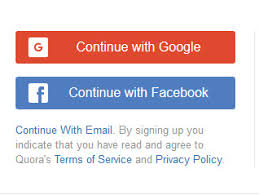
To create a Quora account, you'll need an email address or a Facebook account. You'll be brought to the Quora Account Sign in screen if you've never logged in before (see above image). If you want to access the signup choices, log out of your current account.


  1. Choose from Google, Facebook or sign up with email


Quora setting up

A Quora account can be created in one of three ways. You'll be sent to a different window for each option.


Step 1 – Continue with Your Google Account


If you choose the Google account option, you will join up with Quora using your

Gmail account. A popup will appear, requesting that you sign in. Your Quora account

will be established automatically once you sign in. Continue to step 3 for more

information.


Step 2 – Continue with your Facebook account

You may also sign up for Quora using your Facebook account. If you select this

option, you will be directed to the Facebook website, where you must log in.


After logging into your Facebook account, click the blue box to allow Quora access to

your Facebook profile image and email address.


Your Quora account will be established immediately after you grant permission to

Quora. You could be asked to invite your Facebook friends after that. You have the

option to do so or not. Continue to step 3 for more information.


Step 3 – Sign up with email


Signing up using your email address is the third option. You can still use your Gmail

account for this option, but it will no longer be linked to Quora. A window will appear,

prompting you to enter your name and email address. A verification code will be

emailed to your email when you click next.

A window will appear, prompting you to enter your name and email address. A

verification code will be emailed to your email when you click next.


  1. Select at least 10 topics to follow.

After you've signed up, a modal window will appear, asking you about your

interests and   offering you a variety of themes to choose from. Choose at least

ten topics that are connected to your blog's theme. If you think the themes are too broad, it's fine to choose additional, seemingly unrelated topics; you can always edit them later.


  1. Complete your bio.

Now is the moment to finish your bio! To have a more tailored feed, reach out to like-minded users, and let other users know that you're an authority on any given topic, you want to be as thorough as possible.


You can add your professional credentials as well as educational credentials. Your professional background persuades Quora users that you are knowledgeable. It will also aid in the creation of your feed.


Your educational experience will help you gain credibility on Quora, especially if you'll be answering questions in your field of study. When creating an account, don't forget to complete this step.

Quora will be able to serve you with geo-specific material if you include the areas you've lived and are now living on your profile.


Take a few minutes to set up a brief bio about yourself. It can be brief and to-the-point, or you can write a complete paragraph about yourself, your background, and your ambitions to give depth to your responses. This can take some time, but it'll be well worth it once you're on the first page! 5. 5.Join Quora as a user.

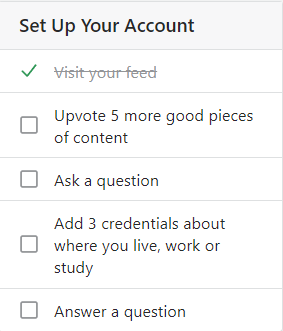
Now that you have a Quora account, it's time to start answering questions and become an active Quora user. Quora can assist you with this by providing you with a checklist of more than three distinct ways to get started! Begin by scrolling through your feed and upvoting material you enjoy.


You can join Quora Spaces and follow Quora users in your chosen topic. Quora spaces are similar to Facebook Groups in that they allow you to join like-minded people in discussing specific topics in a more private and engaging environment.


It's time to accomplish what you came to Quora for – answering questions — once you've completed their step-by-step process. You will be given an initial list of generic questions to answer by Quora.


The majority of these questions are life-related and may be answered in depth by almost everyone. You will be asked more specific questions as time goes on, ones that are more tailored to your niche, skill, and knowledge. This is Quora informing you that they are looking for your own answer.